Free photo and video resizer
With ever-evolving technology, it is easier now for people to take photos and videos. Smartphones and digital cameras make it possible to capture moments without bringing bulky devices. However, the photos' file sizes are always too large to send via email and messaging apps. Luckily, some multimedia apps can solve this problem. TinyPic is a photo-sharing and video-sharing app that makes it easy to share images and videos online. It lets you modify the size of your files to fit the size limits of emails.
Top Recommended Alternative

Shrink your photos
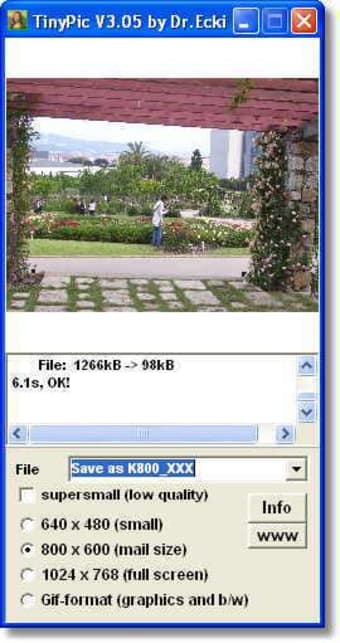
TinyPic is an automatic file resizer. As the name implies, it primarily shrinks down the size of your pictures to smaller sizes. The app shrinks down image files so that they are only 1/20 of the size of the original. With this, you can easily send as many as 100 images in one single email.
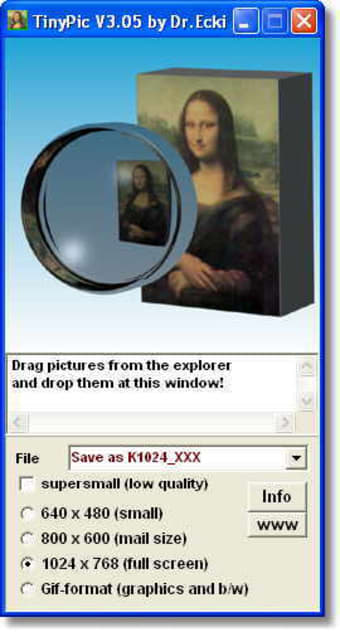
The tool comes with a simple and uncomplicated interface. Adding images is as easy as dragging and dropping them to the window or browsing through them using the file browser. Moreover, it allows the processing of multiple files so you can finish the job quickly. Not only that, but the app works with plenty of file types, including PNG, GIF, EPS, JPG, and BMP.
Once all images are added, you can then select your desired size from the predefined value. You can choose between 640x480, 800x600, 1024x768, and 1600x1200 pixels. You can then proceed with the resizing operation after that. There is a file queue available in the app's window, which shows you the status of each entry.
Upon resizing the image file, the app automatically saves the resized image as a new file. There are numerous options as to how you can store the original large file. You can put them in a folder or create a subfolder for it. TinyPic does not delete your original file, so you don't have to worry about losing them. On top of saving the resized file, the app also generates a link, so you can easily share them with other people.
TinyPic resizes your images to a size that is ideal for sending via email. The file sizes it offers also make sure that there is enough image quality left to the file. However, there is an option to make the image extra small. Although, using it sacrifices the quality of your original file.
Shrink your videos
TinyPic is primarily a photo resizer. However, as noted, it also works for videos. With this, you can send video files without overloading the email client's file size capabilities. Video resizing has the same process as photo resizing. However, there are a few considerations to make.
For one, the app does not accept standard-definition videos that are larger than 500 megabytes or longer than 15 minutes. If you add a video longer than the mentioned duration, the app will truncate it to 15 minutes. High-definition videos are still accepted. However, it should not exceed the 500-megabyte limit and should not be longer than five minutes. TinyPic supports even unusual video formats.
Works as advertised
All in all, TinyPic is a handy app that you can use if you often send images online. The app has a good response time and delivers the items fast without sacrificing quality. It also does not require high amount of resources and is not prone to crashing and freezing. On the downside, it only works as a resizer. It has no other function, such as simple photo editing tools. Moreover, it cannot resize images to a user-defined value. Nevertheless, it is an app that does what it promises to do.